Skip to content

Launch offer: Pro is 50% off — $9.99 $4.99 a month for your first 3 months.

See pricing
Orphia

For pianists who read music

The music on your stand,
with a teacher's ear.

Take a photo of any printed page. Orphia turns it into a score that follows each note you play on your keyboard, then points to the bars that need work and gives you a short drill for each one.

Free to download · No sign-up to start · iPad, iPhone and Android

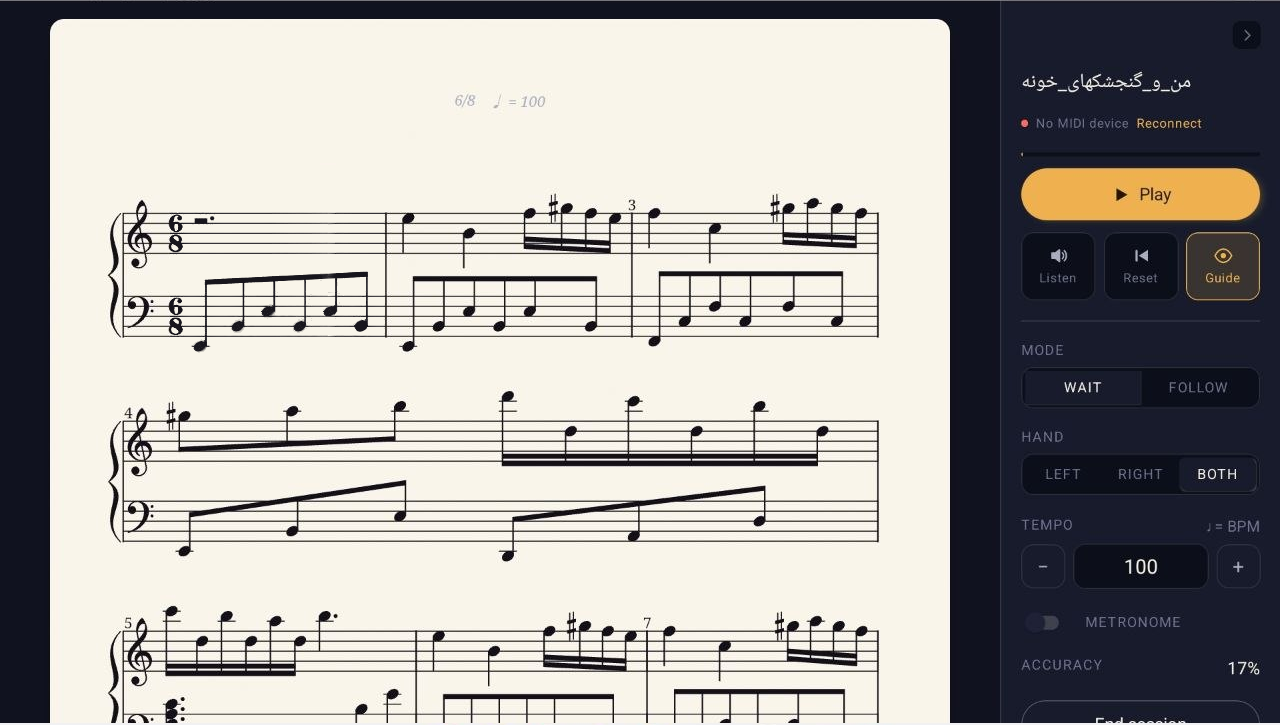
Orphia scanning a printed piano score, then following it in a practice session: a gold playhead moves through the bars and each note turns green when it's played right, red when it isn't.
Keyboard connected

Bar 1 of 32

Pause
Listen
Start over
Guide

Practice

WaitFollow

Hand

LeftRightBoth

Tempo

−100+

At the score's tempo

Metronome

Accuracy

—

End session & see results
  • Any digital piano or MIDI keyboard
  • USB MIDI
  • Bluetooth MIDI
  • iPad and Android tablets
  • iPhone and Android phones

How it works

From a photo to a score that follows you.

Three steps, and the first one takes about a minute.

  1. Sharp — hold still
    1

    Photograph the page

    Use the in-app camera, which tells you when the page is flat and in focus, or import a PDF or image. About a minute later you have a playable score.

  2. Your photo

    What we read

    Key signature fixed
    2

    Check what Orphia read

    Your photo and the score sit side by side. If a clef or key signature came out wrong, one tap fixes it before you start.

  3. Keyboard connected4 of 4 right
    3

    Play, and Orphia keeps up

    Connect your keyboard and start playing. Notes light up as you hit them, and the score either waits for you or keeps the beat. You choose.

Why Orphia

Other piano apps make you choose.

Learning apps give you feedback, but only on the songs they sell. Score readers will open your own music, but they can't tell you how you played it. Orphia gives you both.

Learning apps

Good feedback, but only on songs from their own library.

  • Practise your own sheet music(no)
  • Note-by-note feedback and drills(yes)

Score readers

Open your music, but can't tell you how you played it.

  • Practise your own sheet music(yes)
  • Note-by-note feedback and drills(no)

Orphia

Feedback and drills on whatever music you put in front of it.

  • Practise your own sheet music(yes)
  • Note-by-note feedback and drills(yes)

Inside Orphia

What a session looks like from start to finish.

Gymnopédie No. 1 — Satie

♩ = 72

Practice

WaitFollow

Hand

LeftRightBoth

Tempo

−58+

80% of the score's tempo

Start & loop

Looping bars 6–7

Goes back to the start when it ends

Note names

OffC DDo Re1 2

Practice

Learn it slowly, then play it in time

Start in Wait mode, where the score holds still until you find the right key. Once the notes are under your fingers, switch to Follow and play along at tempo. You can slow things down, practise one hand at a time, or loop the bar that keeps catching you.

  • Wait and Follow modes
  • Left hand, right hand, or both
  • Tempo from a crawl to full speed
  • Loop any bar or passage
  • Metronome and Listen
  • Note names: C D, Do Re or 1 2

This piece

Based on 6 sessions · 2,140 notes

This is holding you back:

You're rushing ahead of the beat

TimingBars 12–16 · High confidence
Drill this

Worth practising deliberately:

You're forgetting the key signature on some notes

Pitch · Bars 3, 7, 21

2 more things found this session — see why, with Pro.

Feedback

Find out why a passage keeps going wrong

After each run, Orphia looks at the pattern behind your mistakes, not only the wrong notes. Maybe you rush the same four bars, drop an accidental, or read the left hand a third too low. It tells you which one, and where, in plain words.

  • Findings across pitch, timing, rhythm, hands, reading, consistency and touch
  • Points to the exact bars
  • Tells you how sure it is

Free shows your top finding each session. Pro shows every finding, with the reason.

Drill · Bars 12–16

Step 3 of 4

Step cleared.

94% at 72 BPM. Next, the same bars at 84 BPM.

Drills

A short drill for each problem

Each finding comes with a drill built on the bars that need it. You start slowly and raise the tempo step by step, and only clean runs move you up. At full speed, the passage goes back into the piece.

  • Built from your own playing
  • A tempo ladder that only counts clean runs
  • Ends with the passage back in context

Free includes one drill a month. Pro drills every finding.

Today's practice

20 minutes, built from your own playing

102030
  1. Warm-up

    3 min

    Your drill at 84 BPM

  2. Focus· Up next

    6 min

    Loop bars 12–16 at 72 BPM

    Because you're rushing ahead of the beat.

  3. Run-through

    8 min

    Play Clair de Lune all the way through

  4. Review

    3 min

    Check bars 3–4 again

Today's practice

Know what to play before you start

Tell Orphia how much time you have and it plans today's session from your recent playing: a warm-up on your drill, a focused loop on the weak bars, a full run-through, and a quick check on something you fixed last week.

  • 10, 20 or 30-minute plans
  • Spaced reviews so fixes stay fixed
  • A gentle reminder, only on days you haven't played

20 and 30-minute plans and spaced reviews come with Pro.

Fixed lately

You've stopped rushing

Bars 12–16 were on the beat in your last 5 runs.

38% → 4%

12

day streak

Skill profile

Based on 23 sessions · 9,870 notes
  • Pitch88
  • Timing74
  • Rhythm81
  • Hand coordination67
  • Note reading92
  • Consistency78
  • Expression63

Progress

See what's actually improving

Orphia keeps track over time. It tells you when something is getting better, when it's fixed, and when an old habit creeps back. You can replay any run note by note, see your skill profile across pieces, and read a summary of your week every Monday.

  • “Fixed lately” — with the bars and the numbers
  • Replay a run note by note
  • Streaks, weekly report and skill profile

Your latest run on each piece is always free to replay.

Who it's for

For people who already play a little.

You can read music, you have pieces you want to learn, and you'd like more help than a metronome can give.

No. 1

Coming back to the piano

You played for years, then stopped. The books are still on the shelf. Orphia lets you pick those pieces up again at the level your hands are at today.

No. 2

Practising between lessons

Your teacher hears you for an hour a week. Orphia is there for the practice in between, so you turn up to your next lesson with the hard bars sorted, not just repeated.

No. 3

Teaching yourself

You read music and you know what you want to play. What you don't have is someone pointing out what's going wrong. Orphia fills that gap.

Worth knowing: Orphia doesn't teach piano from scratch. If you've never read music, lessons are the better place to begin. Orphia becomes useful once you're working on real pieces.

Your practice stays between you and the piano.

Orphia reads the notes from your keyboard and nothing else. Only you can see your scans, and you can download or delete your data from Settings whenever you want.

Read the privacy policy
  • No ads
  • We never sell your data
  • No audio recordings
  • Export or delete anytime

Pricing

Practice is free. Pro adds the coaching.

Both plans let you practise as much as you want. Pro shows every problem Orphia finds and gives you a drill for each one.

Free

Practise every day without paying a thing.

$0forever


  • Unlimited practice — Wait, Follow, loops, metronome
  • Scan 3 pages a month
  • Your top finding after each session
  • 1 drill a month
  • 10-minute daily plan
  • Replay your latest run on each piece
Download free

No account needed to start.

Pro

Launch offer · 50% off

Every finding, with a drill to work on each one.

Regular price $85Launch price $42.50/year

$3.54 a month for your first year, then $85 a year

  • Everything in Free
  • Scan whole pieces — up to 150 pages a month
  • Every finding, with why it happens and where
  • A drill for every finding, with a tempo ladder
  • 20 and 30-minute plans with spaced reviews
  • Your skill profile across every piece
  • Replay every run, and the full weekly report
Get Pro

3-day free trial, then billed yearly.

Compare every feature

Coming next

For piano teachers

With your students' permission, see what Orphia finds in their playing between lessons, and assign a drill on the exact bars in one tap.

Join the teacher waitlist
Coming next

For families

One tablet for the whole household. Each learner keeps their own pieces, plan and progress, and a parent PIN protects purchases and settings.

Learn more

Questions

Before you sit down.

All questions
What is Orphia?

Orphia is a piano practice app that works with your own sheet music. You photograph a page and it becomes a score that follows you as you play. Orphia marks each note, spots the patterns behind your mistakes, and gives you short drills to work on them.

What do I need?

An iPad, iPhone or Android tablet or phone, and a digital piano or MIDI keyboard connected by USB or Bluetooth. A tablet on the music stand is the nicest way to use it; phones work in landscape.

Most digital pianos made in the last decade have MIDI. If yours has a USB port marked “USB to Host”, or Bluetooth MIDI, you're set.

Is Orphia for complete beginners?

Orphia works best if you can already read a little music and want to play real pieces: returning players, students between lessons, and people teaching themselves. Wait mode and note names help a lot early on, but Orphia isn't a game-style course that teaches piano from scratch.

What sheet music can Orphia read?

Printed piano music: books, photocopies and PDFs. Handwritten music isn't supported yet. Clean, well-lit pages give the best results.

How does Orphia know what I'm doing wrong?

Your keyboard tells Orphia exactly which notes you played and when. Orphia compares that with the score over several runs and looks for patterns, like rushing in the same bars or missing the same accidental. Then it tells you what it found, where, and how sure it is.

What's the difference between Free and Pro?

Free gives you unlimited practice, 3 scanned pages a month, your top finding after each session and one drill a month. Pro scans up to 150 pages a month and unlocks every finding, unlimited drills, longer daily plans with spaced reviews, your skill profile, and replays of every run.

Is there a launch discount?

Yes. While we launch, Pro is 50% off for new subscribers: $4.99 a month for your first 3 months, or $42.50 for your first year on the yearly plan. After that it renews at the regular price, and you can cancel any time in your store account.

Pick a piece and give it a try.

Choose something you've been meaning to get right, scan the first page, and see what Orphia notices in your playing.

Free to download. You can start without an account.